
Every time your team opens InDesign and manually copies a price from a spreadsheet into a catalog layout, you're doing the same thing a printing press operator did in 1985, just with a mouse instead of typeset blocks. That's the problem database publishing solves. And it's why more and more operations, marketing, and e-commerce teams are moving away from one-off catalog projects and toward an automated, data-driven production pipeline.
This guide breaks down what database publishing actually is, how it works in practice, and what it means for teams managing large or frequently-updated product catalogs with or without Adobe InDesign in the mix.
Database publishing is the process of automatically generating designed documents catalogs, price lists, product sheets, brochures by pulling structured data from a data source (a spreadsheet, ERP, PIM, or DAM system) and merging it into predefined layout templates. Instead of a designer manually placing text and images for each product, a database publishing system does it programmatically: one record per layout, thousands of pages at once.
The term covers a broad range of tools and approaches, from Adobe InDesign's native data merge feature to dedicated automation platforms and modern cloud-based solutions. What they all share is a fundamental workflow: data source → template → output file.
A catalog with 500 SKUs, each requiring a product name, price, image, and description, means 2,000+ individual copy-paste operations, every single update cycle. With database publishing,
A catalog with 500 SKUs, each requiring a product name, price, image, and description, means 2,000+ individual copy-paste operations, every single update cycle. With database publishing, the same catalog regenerates from a data source in minutes. Update a price in the ERP the next published version reflects it automatically.
Database publishing is not just a design shortcut. It's the infrastructure behind scalable, accurate, and on-brand catalog production and it's increasingly the standard for any company managing more than a few dozen products across more than one market or channel.
The core workflow has four stages. Understanding each one helps you evaluate tools and identify where your current process breaks down.
1. Structured data in a defined format
Your product data needs to live somewhere structured: a CSV export from your ERP, an XML product feed from your PIM system, a JSON API response, or even a well-structured spreadsheet. The key is that data must be consistent, the same fields in the same places for every record. Field mapping (connecting your data columns to template placeholders) only works reliably when the source is clean.
2. Template with mapped placeholders
A database publishing template is a designed layout with variable fields where product data will flow in. A placeholder like {{product_name}} or an InDesign data merge tag like <<product_name>> tells the system: insert this value from the data source here. The template handles design typography, spacing, brand assets, color while the data source handles content. This is what makes the output both automated and on-brand.
3. Merge and render
The publishing engine iterates through each record in your dataset, populates the template with that record's values, renders the layout, and adds it to the output. Batch processing means this happens for all records in a single run, whether you have 50 products or 50,000.
4. Output in the right format
The finished document can be exported as PDF for print production, HTML5 for interactive digital catalogs, EPUB for digital publishing, or directly published as a flipbook. Modern tools can generate multiple output formats from the same template and data source in a single pipeline.
CSV/XML import and product feeds explained
The two most common data formats in catalog automation are CSV and XML, and they behave very differently.
CSV product feeds
A CSV file is a flat table: one row per product, columns for each attribute, SKU, name, price, description, image URL, category. CSV is the most portable format almost every ERP, PIM, and e-commerce platform can export it. For catalog automation, CSV works well when your product structure is relatively flat.
The main limitation of CSV for database publishing is that it doesn't natively support relationships or hierarchy. A product with multiple color variants and different images per variant requires either multiple rows with repeated data, or preprocessing before import.
XML product feeds
XML handles structured, hierarchical data much better. A product with nested attributes, multiple images, category trees, and localized content is cleanly expressible in XML. Adobe InDesign's data merge and most enterprise database publishing tools natively support XML import.
An XML stylesheet (XSLT) can format the database output before it reaches the layout engine, transforming raw product feed data into a structure that maps cleanly to template fields. This is particularly valuable when pulling from PIM or ERP systems that export in proprietary formats.
JSON and API-connected product feeds
Increasingly, catalog automation tools connect directly to product data via API, no file export required. A real-time or scheduled sync pulls current product data, prices, and images directly from the source system and feeds them into the catalog template. This is the architecture behind true automated catalog production: when a product price changes in the ERP, the catalog can reflect it in the next publish cycle without anyone touching a file.
Template mapping and variable data publishing
Template mapping is the process of connecting fields in your data source to placeholders in your layout template. The quality of your field mapping determines whether your automated catalog output looks polished or broken.
What gets mapped
Every dynamic element in your template product name, price, description, category, image, availability, promotional callout, needs a corresponding field in the data source. Good template mapping accounts for:
Variable data publishing
Variable data publishing (VDP) extends template mapping to produce individually personalized documents, not just one catalog layout applied to many products, but layouts that change based on recipient or segment data. A wholesale distributor might send different catalogs to different dealer groups, each showing only the products relevant to that channel, with region-specific pricing, in the local language.
At the catalog level, variable data publishing enables:
Adobe InDesign has been the industry-standard layout tool for print catalogs for decades, and its data merge feature was one of the first widely accessible forms of database publishing. But it has real limitations when used as the primary automation layer for product catalogs.
What InDesign data merge does well
Where InDesign automation breaks down
InDesign data merge was designed for print. It has significant limitations for teams operating today:
Modern catalog automation platforms don't require InDesign at all. They offer browser-based template design, direct data source integration (CSV import, spreadsheet sync, API connection), and multi-format output including interactive digital catalogs. For teams whose primary output is digital or who want their sales teams to trigger updates themselves, this is a more practical architecture than InDesign-based automation.
Catalogy is one such platform. Built specifically for product catalog automation, it lets your team design templates, connect product data, and publish interactive digital catalogs entirely in the browser, no InDesign license, no scripting, no design bottleneck. When your data changes, your catalog updates. When your sales team needs a new variant, they don't need to wait for a designer.
Catalogy is a database publishing platform built specifically for product catalogs with a focus on making automated catalog production accessible to marketing and operations teams, not just developers or InDesign specialists.
The core workflow connects a data source directly to a designed template and publishes the output as an interactive digital catalog your team can share via link, embed on a website, or gate with a lead capture form.
.png)
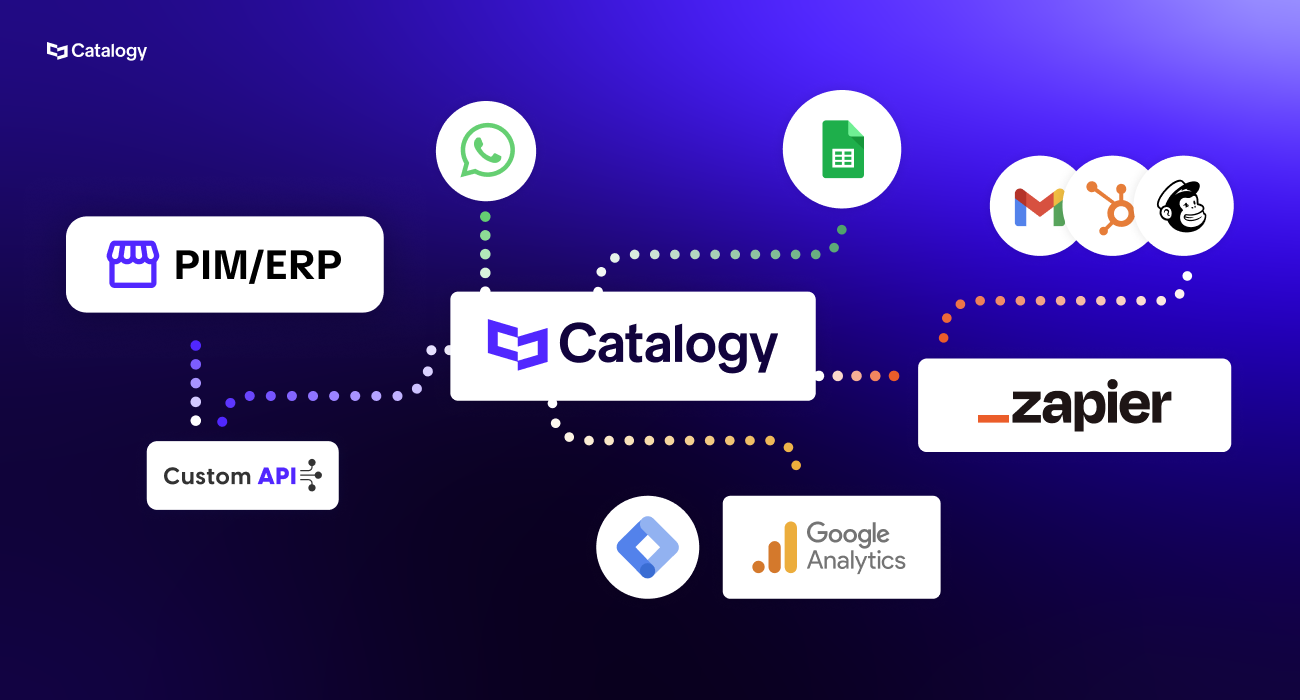
Think of this as the starting line. Before any catalog exists, Catalogy needs to know what your products are. You bring your product data, names, prices, descriptions, images, SKUs and connect it to Catalogy. You don't need to retype anything. If your data lives in a spreadsheet (Excel or Google Sheets), you upload it or connect it directly. If your business already runs a more advanced system like a PIM (a dedicated product information manager) or an ERP (the software that runs your inventory, orders, and pricing), Catalogy can plug into that too via API, meaning the two systems talk to each other automatically, without someone manually exporting files back and forth.
Once connected, your product data maps directly into your catalog template. Every field, product name, price, image, description, finds its place automatically.
Once your data is connected, you need a visual frame for it, that's the template. Catalogy has a drag-and-drop design studio, similar to Canva or InDesign, where your design team can build exactly how you want each product page to look. No coding required. You place blocks on the page an image block here, a price block there, a description below and those blocks are "variable fields," meaning they automatically fill in with the right product data when the catalog is generated.
You can lock elements so sales agents can't accidentally break the design, and you can build as many templates as you need. If you don't have a design team or don't want to spend time on it, Catalogy's in-house designers can build the templates for you.
This is where Catalogy earns its name. Once your template is ready and your data is connected, generating the catalog is not a days-long design project, it takes seconds. You select your template, point it at your product feed, press a button, and Catalogy uses AI to map every product into every page automatically. A catalog with hundreds or thousands of SKUs is built in the time it takes to make a coffee.
And when prices change, or products are added, or a description needs fixing? You update your spreadsheet or data source, go back to Catalogy, press "sync," and the catalog updates everywhere, including the link you already sent to your clients. No redesign. No resending. The same link, always showing the most current version.
The catalog you publish is not a PDF. It's a living, interactive, page-turning document, the kind that feels like flipping through a magazine on a screen. You get a link you can share anywhere: by email, by QR code, embedded on your website, or posted on social media.
Inside the catalog, products are not just images on a page. You can add shopping buttons (so clients add products to a cart and send you a quote request), video embeds (so a product image can play a video with one click), pop-ups with additional product detail, and direct links to your website's product pages. Every element is optional and fully controllable.
Once your catalog is live and shared, you don't go blind. Every published catalog comes with built-in analytics: how many people opened it, how long they spent on each page, which products they clicked on, where in the world they accessed it from, and whether they came from a desktop, phone, or tablet. You can also generate a visual heat map, a click-by-click picture of what your customers are actually paying attention to inside your catalog.
On top of that, if you want to control who sees the catalog before they get in, you can gate it. That means a prospect fills out a form, name, company, email, whatever you ask before the catalog opens. Or you can lock it to a specific list of email addresses, so only your approved B2B clients can access it. You can even set up one-time passwords sent directly to those clients.
Beyond data sources, Catalogy also connects to the tools you use to distribute, market, and measure your catalogs:
Push catalogs out through the right channels
Once your catalog is published, getting it in front of the right people should be just as seamless.
Share directly via WhatsApp for fast, mobile-first distribution to sales reps or dealers. Send via Gmail for more formal outreach. Trigger automated distribution sequences and cross-platform workflows through Zapier. Push catalog leads and engagement data into HubSpot or Mailchimp to feed your marketing and sales pipelines. And track how readers interact with your catalog through Google Analytics.
For distribution and analytics, Catalogy integrates with:
Everything runs from one place. Your catalog updates, your integrations carry it forward.
What's the difference between database publishing and InDesign data merge?
InDesign data merge is one specific implementation of database publishing it uses a CSV file to populate an InDesign layout template and exports a PDF. Database publishing is the broader concept, which can be implemented through InDesign, dedicated catalog automation software, or modern cloud platforms like Catalogy. InDesign data merge is powerful but requires InDesign expertise, doesn't produce interactive digital output, and has no live data sync capability.
Can I do database publishing without Adobe InDesign?
Yes. Modern catalog automation platforms like Catalogy handle the entire database publishing workflow in the browser, no InDesign license or expertise required. These tools are particularly well-suited to teams that need digital catalog output (interactive flipbooks, shoppable catalogs) rather than print-ready PDFs.
What data formats does database publishing support?
The most common formats are CSV, XML, and JSON. CSV works well for flat product data exported from an ERP or spreadsheet. XML supports more complex, hierarchical product structures and is natively supported by InDesign and many enterprise publishing tools. JSON is common for API-connected real-time data sync. Most modern database publishing platforms, including Catalogy,support all three, plus direct spreadsheet connections (Google Sheets, Excel).
How does variable data publishing differ from standard catalog automation?
Standard catalog automation generates the same design for all records in a dataset, it's about efficiency and accuracy at scale. Variable data publishing goes further: it generates documents where the layout, content, or product selection varies based on recipient or segment data. A manufacturer producing separate catalogs for retail, wholesale, and export channels from a single template is using variable data publishing.
How long does catalog automation take to set up?
Setup time depends on the complexity of your product data structure and how much custom template design is needed. A basic automated catalog clean CSV, standard product layout template can be running in a day or two in a platform like Catalogy. More complex workflows involving ERP integration, multi-language output, and conditional formatting may take a few weeks to configure properly. The setup investment is a one-time cost; subsequent catalog updates publish in minutes.
What's the ROI of switching to automated catalog production?
The main ROI drivers are reduced design time per catalog update, elimination of errors from manual data entry, faster go-to-market for new products and seasonal variations, and for digital catalogs engagement analytics that help sales teams prioritize follow-up. Companies with large SKU counts or frequent price changes typically see the fastest payback, since the manual alternative consumes significant recurring labor hours.
Can database publishing handle multi-language catalogs?
Yes. Multi-language catalog production is one of the strongest use cases for database publishing. With properly structured data, the same template can generate a catalog in as many languages as your dataset supports, all in a single batch run. This eliminates the need to manually recreate layouts for each market.
.png)