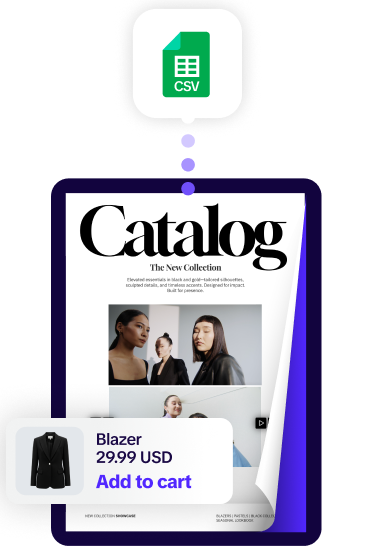
In many companies, creating a product catalog is a slow, manual task that everyone dreads. It usually marks the beginning of "catalog season", a period of several months spent collecting product data from various departments, sending it to a designer, and sitting through endless rounds of proofreading to catch tiny errors. By the time the final version is approved and ready to share, the market has often moved on. Prices may have shifted, new models may have been released, or high-demand products may have gone out of stock.
This delay isn't just a marketing headache; it’s a business bottleneck. It makes it harder for sales teams to do their jobs effectively and leads to significant wasted time and money. When your sales assets are always three steps behind your inventory, you are losing opportunities every day.
Moving to a system that allows for instant, automated catalog generation changes the entire process. Instead of treating a catalog as a long-term, static project, you treat it as an automated output of your live product data.
At Catalogy, we provide the professional infrastructure that lets you move from a messy spreadsheet to a fully automated product catalog in minutes.
When you build a product catalog manually, you are essentially asking your team to act as a human copy-paste machine. You take information from a database or an Excel sheet and manually place it into a design file. This process is outdated and creates several practical problems for a modern business:
Manual catalog creation is expensive. You are paying internal staff or external design agencies for hundreds of hours of repetitive work. This includes manual data entry, aligning images, adjusting text boxes, and formatting tables. These are hours that your team should be spending on strategy, branding, and closing deals, not on moving SKUs around a page.
Whenever a human is responsible for entering thousands of data points, errors will occur. A typo in a part number or an extra zero on a price might seem small, but in a B2B environment, these mistakes are costly. Incorrect pricing can lead to lost revenue, legal disputes, or at the very least, a loss of professional trust with your distributors.
If it takes two months to produce a catalog, your business cannot be agile. You cannot react quickly to a competitor's price drop or launch a "New Arrivals" collection the moment the products arrive at the warehouse. In a competitive market, the brand that gets its information to the buyer first is usually the one that wins the sale.
To understand how to generate automated catalogs, you first have to understand the concept of a data-driven asset. In the old way of working, the design and the data were two separate things. In the new way, they are connected.
An automated catalog is a web-native asset that is built using a software engine. You provide the data (the names, prices, and images) and a template (the look and feel), and the software builds the catalog for you. This removes the need for a designer to touch every single page. Because the catalog is generated rather than designed, the process happens almost instantly.
At Catalogy, we have simplified the process so that you can move from raw data to a finished sales tool without the usual design delays. We handle the technical side so that you can focus on your inventory. Here is how the practical process works:
The first step is simply organizing your information. You don't need fancy software for this. You just need to gather your product names, SKUs, prices, descriptions, and image links into a standard format.
Once your data is ready, you upload the feed to the Catalogy platform. This is where you decide how the catalog will look.
This is the part that used to take weeks. Now, you simply click "Generate." The system reads your product feed and automatically lays out every product, image, and price into the template you chose. Within seconds, a multi-page catalog is built with perfect alignment and zero manual entry errors.
Your catalog is now a live link. You can send it to customers, embed it on your website, or share it via a QR code. The best part? If a price changes in your spreadsheet tomorrow, you don't need to re-upload anything. You simply click "Sync," and the live catalog updates instantly.
.png)
Generating a catalog in minutes isn't just a convenience for the marketing department; it is a strategic tool that helps the sales team move faster and more accurately.
When you can update a catalog in minutes, your sales team never has to apologize for an old price or an out-of-stock item. You can sync your data as often as you need, daily, hourly, or even by the minute. This ensures that what the customer sees is exactly what is in your database.
Because the generation process is so fast, you aren't limited to one "Master Catalog" that overwhelms everyone. You can create smaller, targeted catalogs for specific needs.
In a manual workflow, sales reps often end up with multiple versions of a PDF on their hard drives. They might accidentally send an old version to a client. With a digital system, you share one permanent link. When you update the data, that link stays the same, but the content changes. Your customers and your team will always have the most current version of your brand.
The goal of generating catalogs in minutes is to make your business more efficient and responsive. When you remove the manual work, you save money on design costs and free up your team to focus on high-value tasks, like selling products and building customer relationships.
Using an automated infrastructure turns your product list into a flexible, accurate, and professional sales tool. It ensures that your business can move as fast as the market does, without being slowed down by the old, manual way of making documents.
At Catalogy, we help businesses move away from the frustration of manual PDFs and toward the speed of automated, web-native catalogs. We provide the tools you need to stay accurate, save time, and give your sales team exactly what they need to win in a fast-paced market.
It works by using a "Template Engine." Once you define the layout (where the images, headers, and prices go), the software simply "fills in the blanks" using the data from your spreadsheet. It can process hundreds of items in the time it would take a human to design one page.
No. Most companies already have their product data in a CSV file or a Google Sheet. Our system is built to recognize those standard formats. Once the columns are mapped, the automation does the rest.
Yes. In fact, the more products you have, the more time you save. Generating a 1,000-page catalog takes almost the same amount of time as generating a 5-page one because the software handles the scale automatically.
Absolutely. You aren't limited to a "generic" look. You can use our preset professional designs or work with our team to create a custom-branded template. Once that template is created, the automation follows those specific rules for every product you add.