.png)
Published on: February 25, 2026
A shoppable catalog is the most effective way to eliminate the friction that exists between seeing a product and buying it. For years, the industry relied on paper books and heavy PDF files to showcase inventory. These methods are now outdated. They create barriers between the seller and the buyer. Today, sales-led organizations are shifting toward interactive experiences. This transition is not just about aesthetics. It is about removing friction from the procurement process.
At Catalogy, we provide the white-label infrastructure for this transformation. We help you turn your product lists into high-performance sales engines. In this guide, we will explore the benefits of this technology. We will also look at real-world examples from global brands. By the end, you will understand how to use these tools to grow your revenue.
A shoppable catalog is a digital publication that allows users to purchase items directly from the page. It is much more than a simple flipbook. A flipbook only mimics the turning of a page. A shoppable version integrates e-commerce functionality into every pixel.
Imagine a retail buyer browsing your new seasonal line. They see an item they like. In a traditional digital catalog, they would have to write down the SKU. Then they would open their email or a separate portal. They might even have to call a sales representative. Every one of these steps is a chance for the deal to fail.
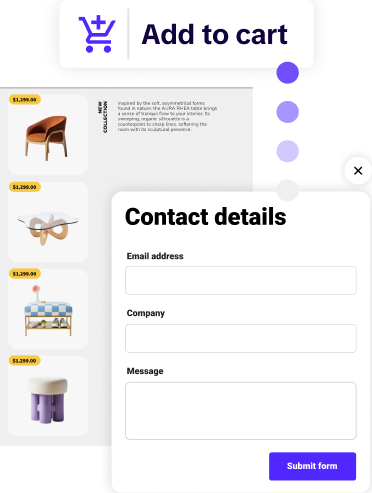
In a shoppable catalog, that same buyer simply clicks a product tag. A window opens with all the necessary details. They can see pricing, color options, and inventory levels. With one more click, the item is added to an order list. The process is seamless. It blends the discovery phase with the transaction phase. This is the future of B2B commerce.
In a shoppable catalog, that same buyer simply clicks a product tag. A window opens with all the necessary details. They can see pricing, color options, and inventory levels. With one more click, the item is added to an order list. The process is seamless. It blends the discovery phase with the transaction phase. This is the future of digital commerce. It meets the buyer where they are, at the height of their interest.

The PDF was invented in the early 1990s. It was designed to preserve the layout of a document for printing. It was never intended to be a sales tool. Despite this, many companies still use it as their primary digital asset. This is a mistake.
When you send a PDF to a client, you lose all visibility. You do not know if they opened it. You do not know which products they looked at. You cannot tell if they spent five minutes on the front page or thirty minutes on page ten.
A shoppable catalog provides deep analytics. You can track every interaction. This data is gold for your sales team. If a rep knows a client spent time looking at a specific category, they can tailor their follow-up. They can call with a specific offer. This is proactive selling rather than reactive guessing.
Prices change. Products go out of stock. Errors happen. In a PDF-based workflow, every change requires a new file. You have to re-export the document. You have to re-upload it. You have to send a "disregard previous version" email to your entire list.
With an interactive solution, you update the master file once. Every link currently in the hands of your customers updates instantly. There is only one version of the truth. This prevents pricing disputes and improves the customer experience.
Try reading a 50MB PDF on a smartphone. It is a frustrating experience. You have to zoom in to read the text. You have to pan left and right to see the images. It is clunky and slow.
Modern shoppable catalogs are web-native. They are fully responsive. They load instantly on any device. Your sales reps can show your products on a tablet in the field. Your buyers can place orders from their phones in the warehouse.
Merely having the technology is not enough. You need to use it effectively. Here are six proven strategies to maximize your sales output.
B2B buying is different from B2C shopping. B2C buyers want a "Buy Now" button for a single item. B2B buyers usually need to order in bulk. They need a "Shopping List" feature.
Your shoppable catalog should allow buyers to build a comprehensive list as they flip through. They can select quantities for multiple SKUs. When they are finished, they can submit the entire list as a quote request. This reduces the time spent on manual data entry for both parties.
A catalog that is too crowded is hard to read. You want your high-quality imagery to shine. Use interactive product tags to hide the "boring" details until they are needed.
When a user hovers over an item, a tag appears. When they click it, a popup shows the technical specifications and price. This keeps the layout beautiful while providing all the necessary information for a procurement officer. It is the best of both worlds.
Shipping samples is expensive. Sometimes, it is impossible for larger items. Video is the next best thing.
You can embed video demonstrations directly into your shoppable catalog. Show the product in motion. Explain how it works. A 30-second video can convey more than three pages of text. It builds confidence in the buyer and speeds up the decision-making process.
In a volatile market, prices can shift weekly. If your catalog is integrated with your backend, you can show live pricing.
This transparency is highly valued by B2B buyers. It prevents the friction of "price checking" calls. If a buyer knows the price they see is the price they will pay, they are much more likely to complete the order on the spot.
General catalogs are great, but personalized catalogs are better.
With Catalogy, your sales reps can create custom versions of a catalog for specific clients. They can hide categories that aren't relevant. They can highlight "Specials" just for that partner. This level of personalization makes the buyer feel valued. It turns your catalog into a bespoke presentation.
A digital catalog should be an SEO asset. Unlike PDFs, which search engines struggle to index properly, web-based catalogs are crawlable.
Ensure you are using your primary keyword, shoppable catalog, in your metadata. Use alt-text for your images. This allows your products to show up in search results directly. You aren't just selling to existing clients; you are attracting new ones through organic search.
To build a catalog that actually converts, you need specific interactive elements. Here is what should be included in every publication.
Success leaves clues. Let's look at two companies that transformed their sales by moving away from static files.
Melissa & Doug is a global leader in the toy industry. They have a massive product range and thousands of retail partners. Their old process was slow. They used one platform to create the catalog and another to manage orders. There was no connection between the two.
By switching to a one-stop digital platform, they streamlined everything. They used automated tools to populate their catalogs with product data. Their retail partners could now browse and order in one place. The result was a significantly faster sales cycle and fewer ordering errors.
Electrolux is a world leader in home appliances. They needed to provide their trade partners with an engaging way to learn about new products. A static PDF was not sufficient for high-end technology.
They used shoppable catalogs to create a multimedia experience. They included videos of appliances in action. They used interactive tags to explain complex features. This helped their trade partners sell the products more effectively to the end consumer. It also allowed Electrolux to track which innovations were getting the most attention in different markets.
One of the greatest strengths of Catalogy is its flexibility. We do not provide a "one size fits all" tool; we provide a scalable infrastructure that fits the specific needs of your business.
Whether your organization needs a simple way to flip a PDF into a shoppable asset or a complex, enterprise-level integration involving thousands of SKUs and automated data feeds, our platform is designed to handle the load. We provide the foundation that allows your digital sales assets to grow as your revenue grows.
The digital landscape is more competitive than ever. Your buyers are being bombarded with information every day. If your sales materials are hard to use, you will be ignored.
A shoppable catalog is not a luxury. It is a necessity for any business that wants to scale in a sales-led environment. It provides the data you need to make smart decisions. It provides the convenience your buyers expect. And it provides the professional branding your company deserves.
By removing the "digital dead-ends" of the past, you open the door to a more efficient future. Stop sending attachments. Start sending experiences.
It increases conversions by reducing the "path to purchase." Every time you ask a buyer to leave your document to place an order, you lose momentum. By allowing them to click and buy within the pages, you capture their intent the moment it happens.
Yes. Enterprise platforms like Catalogy are built to connect with your existing ecosystem. You can send order lists directly to your CRM or ERP system, automating data entry and ensuring your sales team can follow up with high-intent leads instantly.
Absolutely. PDFs are "invisible" to search engines and rank poorly. A web-based shoppable catalog is built with modern web standards, meaning search engines can index the text, images, and links. This helps your products rank for relevant search terms.
No. While the infrastructure is powerful, the interface is designed for marketers and sales leaders. If you can manage a digital asset, you can manage a high-quality interactive catalog. The system handles the technical complexity while you focus on the sales strategy.
You get access to a full analytics dashboard. You can see how many people visited, which pages they looked at, and which products they clicked. This allows you to refine your merchandising and marketing strategy based on real-time user behavior.